Fit Comparison
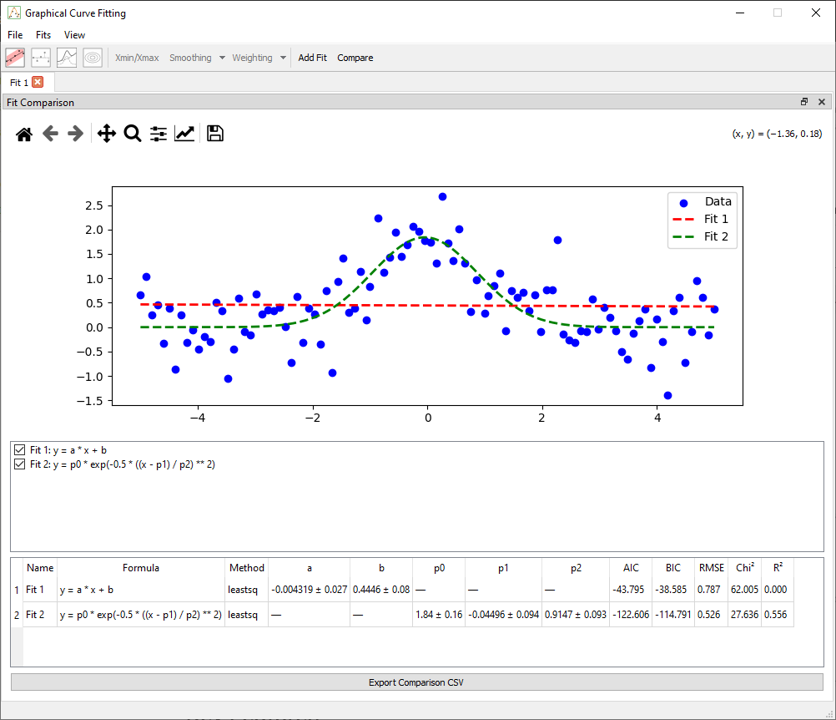
The Fit Comparison mode allows users to store and visualize multiple fitting results side-by-side for the same dataset (1D). This is particularly useful for testing different models, weighting strategies, or fitting methods (e.g., lmfit, odr, or emcee) and evaluating which configuration provides the most accurate or meaningful result.
Overview
Once enabled, comparison mode overlays stored fits onto the main plot as additional curves. Each stored result is displayed in a distinct dashed line and accompanied by a summary table showing key fitting metrics. The raw data remains visible, ensuring that all models can be evaluated relative to the same experimental points.
Key Features
- Overlay multiple stored fits on a single dataset.
- Each fit is rendered with a unique dashed color for clarity.
- Interactive checkbox panel below the plot to toggle fit visibility.
- Summary table with metrics for each stored fit (formula, method, AIC, BIC, RMSE, etc.).
- Export summary tabel in .csv file.
Voici une section supplémentaire que tu peux ajouter à la fin de la documentation fit_comparison.md, pour décrire la fonction Export Comparison CSV, avec un exemple concret basé sur ton image :
Exporting the Comparison Table
Once multiple fits have been added and comparison mode is active, the Export Comparison CSV button allows you to save the full summary table as a .csv file.
This file includes:
- Fit name and formula
- Method used (
leastsq,emcee, etc.) - Source data path
- Estimated parameter values (with uncertainties)
- Fit statistics: AIC, BIC, RMSE, χ², R²
Usage
- Run a fit as usual (using any supported method).
- Click the Add Fit button in the toolbar to store the result.
- Enable Comparison Mode by toggling the Compare button in the toolbar.
- All stored fits will be displayed in the main plot with their details below.
- Use checkboxes to show/hide individual curves or remove fits from the comparison list.
Behavior
- The stored fits are specific to the active tab and not shared across sessions or datasets.
- Fits remain available as long as the tab is open and the data is unchanged.
- If the dataset is cleared or reloaded, the comparison list is reset.
Limitations
- Manual fits cannot be stored or compared.
- Fits are not saved between sessions.
- Only the best-fit curve is stored, not confidence intervals or MCMC traces.